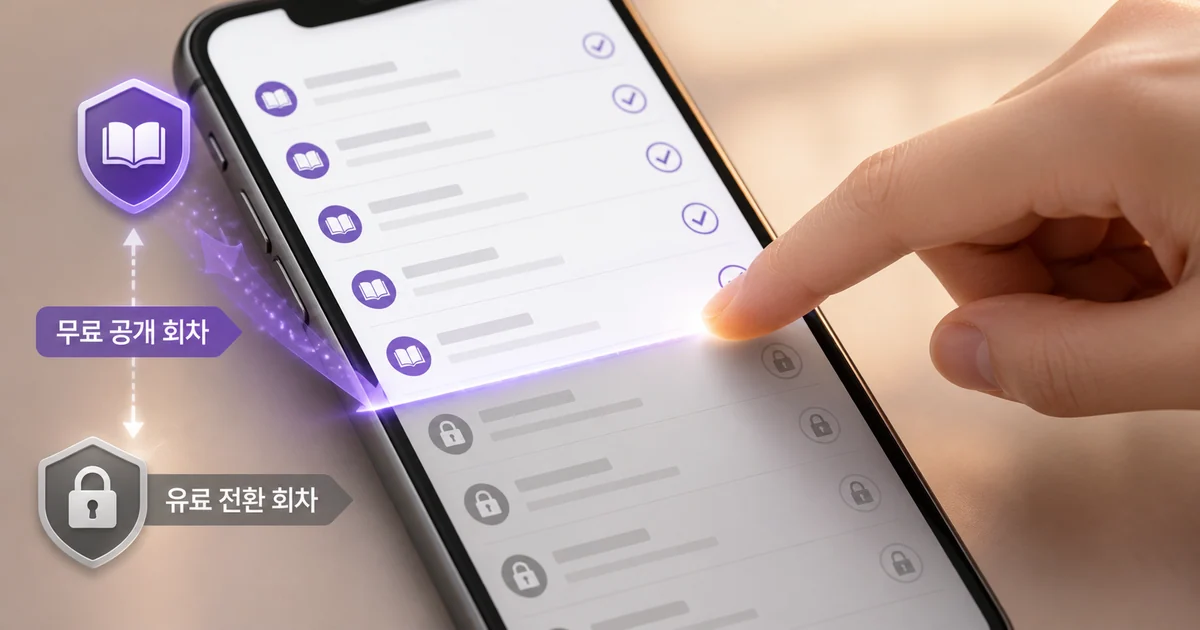
When you binge read web novels for free on Naver Series, the habit that matters most is checking the access terms before you open an episode. Every title has a different number of free episodes, and free passes come with an expiry window. Let the momentum of continuous reading carry you and you can land in paid territory before you notice.
The safest way to read Naver Series for free is simple. Check the free release range on the title's detail page, find the point where the episode list turns paid, then, if you hold a free pass, use it one episode at a time inside its validity window.
How Free Access Works for Naver Series Web Novels
Access terms are set per episode, not per title. Within a single series you can find basic free episodes, episodes that a free pass unlocks, and paid episodes that require cookies, all in a row.
The "Price Information" section on a title's detail page shows the current number of basic free episodes and the cookies needed to purchase each episode to keep. The free release range and the required cookie count differ by title, and the numbers can change. Assuming that "every title is free up to a certain episode" or that "one episode always costs one cookie" will get you into trouble.
Scroll the table horizontally to see more.
| Episode access type | What to check before reading | What to do during a free binge |
|---|---|---|
| Basic free episode | Price information on the title detail page, episode list labels | Read only up to the currently open free range |
| Free pass episode | Whether you hold a pass and its validity window | Confirm the pass applies, then open the episode |
| Paid episode | Rental or purchase to keep terms and required cookies | If you plan to stay free, do not select it and stop here |
| Limited time promotion episode | Number of free episodes and days remaining | Read before it ends, but recheck the current terms |
A large free episode count does not mean every one of those episodes opens on the same terms. Checking the free release range together with the point of paid conversion before you start keeps the flow from breaking.
How to Tell Free Episodes From Paid Episodes
Check the price information on the title detail page
Start with the price information on the title's detail page. It can show that title's basic free episode count, total episodes, and the cookies needed to purchase each episode to keep.
The numbers shown are that title's current terms. They do not carry over to other titles, and the terms may differ the next time you visit. The screen in front of you right before reading is more accurate than what you remember from a while back.
Find where the free range ends in the episode list
Next, scan the episode list and find the episode where the free label stops. The finish line for a free binge is not the latest episode, it is the last episode you can currently open at no cost.
For safe reading, this order works well.
- Before you start, note or write down the last episode marked free.
- Each time you finish an episode, check the access terms for the next one.
- Stop when you see a paid label or a rental and purchase selection screen.
- Return to the title detail page and recheck the free range and pass terms.
"Just one more episode" is a powerful force in this genre. That is exactly why setting the end of your free range in advance beats relying on memory.
Check the remaining days in the free promotion lists
The web novel home has free and limited time promotion menus such as "Free Daily at 10," "Free Pass," and "Time Deal." Those lists can show the number of free episodes and the days remaining for each title.
The dedicated Free Daily at 10 list offers sorting by popularity, newest, and ending soon, and each title displays information in the form "N episodes free, N days left." Those numbers keep changing, so it is best not to build a reading plan around a title's past terms.
How to Binge With Free Daily at 10 Passes
"Free Daily at 10" is a per title event you have to start in the app for eligible works. One free pass is granted the moment you start, and from the next day a pass is granted automatically every night at 10 p.m.
A pass is valid for 24 hours. Collecting passes and saving them for later means they can disappear, so instead of stockpiling free episodes, it suits a rhythm of reading one episode at a time in step with each day's grant and expiry.
A reading order that keeps you from missing passes
- In the app, check whether the title is running Free Daily at 10 and how long the event lasts.
- Start the event and confirm the one pass granted immediately.
- Check whether the pass applies to the episode you want to read.
- After using the pass, check the grant status again after 10 p.m. the next day.
- Plan your next episode around the days remaining and the pass validity window.
Free Daily at 10 can only be started and stopped in the Series app. Even if you found the title on the web, you have to confirm whether it actually started in the app.
How to Avoid Spending Cookies on Naver Series
At a paid episode, stop before you select
If you hold cookies or a pass and select an episode, it can lead straight into the rental or purchase to keep flow. If you only want free access, do not keep tapping next at a paid conversion episode. Check the rental and purchase terms and the required cookie count first.
A payment or access selection appearing on screen is your cue to check whether you have left the free range. Return to the title detail page and see whether you can wait for the next free pass.
Skip Select Purchase during a free binge
Select Purchase in the Series app lets you pick many episodes at once with +10, +50, +100, or select all. If you only mean to read the free range, you have to look carefully at whether paid episodes get selected along with the free ones.
The most conservative approach is to leave Select Purchase closed and work through the regular episode list one episode at a time up to the end of the free range. If you already picked episodes, tap the X on each selection to cancel, then recheck the actual access terms.
Do not choose "Paid Purchase (Keep) of Free Episodes"
The app also has a feature for buying and keeping episodes you could read for free. "Paid Purchase (Keep) of Free Episodes" is separate from free reading, and that screen does not accept Free Daily at 10 passes.
If reading it right now is enough, the safe move is not to proceed to the purchase to keep screen. Do not relax at the words "free episodes" alone, read on to see whether "paid purchase" or "keep" follows.
Review your cookie auto recharge setting
If you have ever used cookie auto recharge, check that setting too. You can pause it by switching it OFF under "MY > Cookie Auto Recharge Details" on mobile and PC web.
An OFF state can automatically switch back ON after 50 days. If you do not want it to resume, do not rely on the paused state alone, consider full cancellation per the official guidance.
Planning a Web Novel Binge Around the Free Range
A free binge is easier to manage when you split the volume by access type rather than reading a huge stretch in one go.
Read the basic free episodes first
Treat the basic free range you confirmed on the title detail page as your first reading block. Once you finish it, return to the episode list and check the remaining terms rather than letting the next episode open automatically.
Use free passes in order of expiry
A Free Daily at 10 pass is valid for 24 hours, so it does not suit long term hoarding. Read the titles where you have already received a pass, and check the events with the fewest days remaining first, and you cut the chance of losing a free opportunity.
When the free range ends, recheck three things
Once you have read every free episode, look at the following before moving on to the next one.
- Whether the next episode is a paid episode that requires cookies
- Whether an applicable pass, such as Free Daily at 10, exists
- When the promotion ends and when your pass expires
If no free option exists, you can decide on the spot whether to stop and wait or spend cookies. Making that call before you tap the episode, not after, is the safe way.
How to Check Whether a Purchase Can Be Cancelled After Cookies Are Spent
If a paid purchase has already gone through, check whether it happened within the last 7 days and whether you have downloaded the episode. Meet both conditions and you can look into whether purchase cancellation is available.
In the Series app you can find cancellation under "MY > Content Purchase History," and on the web under "MY > Purchase History > Select Genre." Downloaded content does not display a cancel button. If you downloaded only part of a Select Purchase batch, cancellation eligibility for the remainder, excluding what you downloaded, may differ.
Right after you notice a purchase, it is better to check your purchase history first rather than downloading any more of those episodes.
Summary
- Before reading, check the basic free range, the paid conversion point, and the required cookie count in the price information and episode list on the title detail page.
- Free Daily at 10 starts in the app and its passes are valid for 24 hours, so read one episode at a time in step with the grant time and the days left in the event.
- Avoid selecting paid episodes, Select Purchase, and paid purchase of free episodes, and review your auto recharge setting, and you reduce the chance of spending cookies unintentionally.
FAQ
How many episodes of a Naver Series web novel are free?
The number of free episodes differs by title. You have to check the terms right before reading in the price information on the title detail page and in the current episode list.
Where can I tell free episodes apart from episodes that need cookies?
You can check both in the price information on the title detail page and in the episode list. Before opening the episode right after the free labels stop, look at whether it is a rental or purchase and how many cookies it requires.
When are Free Daily at 10 passes granted?
Start the event in the app and one pass is granted immediately, then from the next day one is granted automatically every night at 10 p.m. A pass is valid for 24 hours.
Do cookies get used if I purchase a free episode to keep?
The app's "Paid Purchase (Keep) of Free Episodes" is a paid feature separate from free reading. If you only want to read for free, do not select it.
Can I cancel a paid episode I bought by mistake?
For episodes purchased within the last 7 days and not downloaded, you can check cancellation eligibility in your purchase history. Downloaded content does not display a cancel button.
Was this article helpful?
Read next